Trust first, book second
Both you and the provider pass ID verification before you ever talk — camera-based, done once. No more second-guessing strangers online.
Sa JOph, hindi ka basta nakikipag-usap sa kung sino online — beripikado na ang provider bago pa magsimula ang usapan. Scan their QR code, tanggapin ang Job Order, at subaybayan nang real-time hanggang matapos. Sa home service? Ma-verify mo pa ang mismong personnel bago sila pumasok ng bahay.
Scan their QR code
Job Order accepted
Hi! Can you come at 2 PM tomorrow?
10:32 AMYes, see you tomorrow!
10:34 AMMessage each other directly

Free for you, forever
This isn't just another booking app — it's peace of mind. Here are the benefits, point by point.
Both you and the provider pass ID verification before you ever talk — camera-based, done once. No more second-guessing strangers online.
For home services, scan their Personnel QR against the active Job Order to see a cropped face photo and name — before you open the door.
Everything lives in the Job Order: scope, terms, schedule, price. And it doesn't just sit there — statuses, booking changes, session logs, and payments update live. Your provider sees exactly the same thing.
In-app chat lives within each Job Order — nobody has to dig through other messaging apps. Status and schedule updates show up right there too.
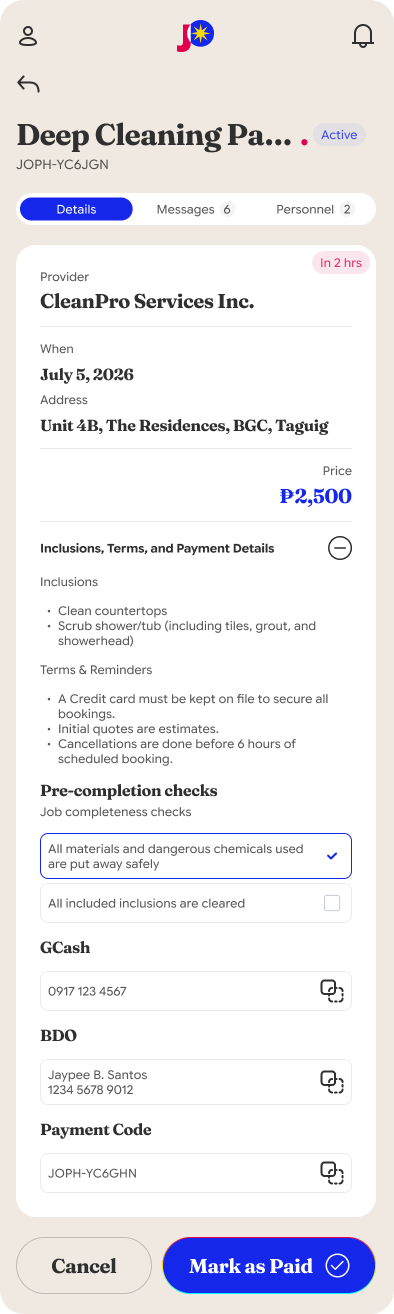
Copy the provider's payment details from the Job Order and pay directly. Nobody holds your money, nothing is marked up — and tagging it Paid is yours to do, so the provider sees your confirmation instantly, timestamped.
Liked the service? Message the provider again right after a successful Job Order — no searching, no starting over.
The most delicate part of home services: letting someone into your home. JOph gives you a way to be sure — a Personnel QR you can scan against your active Job Order.
Every technician or team member carries a permanent Personnel QR code — it can't be passed around to someone else.
The scan checks whether an active Job Order from that personnel matches your account. No match, no entry.
Their cropped face photo and name appear from verified onboarding. Match? Let them in. Not a match? You're warned immediately.
It works for aircon repair, home repair, cleaning, appliance repair, plumbing, home-service massage — any service that comes into your home.
Maps and promos just landed — both built around making repeat bookings effortless.
Service providers pin their business address on an OpenStreetMap — check exactly where they operate before you even scan their QR.
When your provider turns on live location for an active Job Order, you both appear on the same shared map inside the JO details, refreshed every minute. It runs only while details are open — and switches off when the job ends.
Rebook a provider you've completed a Job Order with, and their auto-promo discount is applied to your price instantly. No coupon codes to find. Nothing to claim.
You verify yourself exactly once — after that, everything is scans.
Snap a photo of your ID, then take a selfie holding it. You'll only do this once — never again.
When you need a service, scan the provider's QR code to pull up their active Job Order.
Accept the Job Order, chat inside it, and follow the record live — status, booking changes, session logs, all the way up to the paid tag. You and your provider always see the same thing.
Copy the payment details, pay the provider straight, and tag the Job Order as Paid to close the record. Loved the work? Message them again next time.
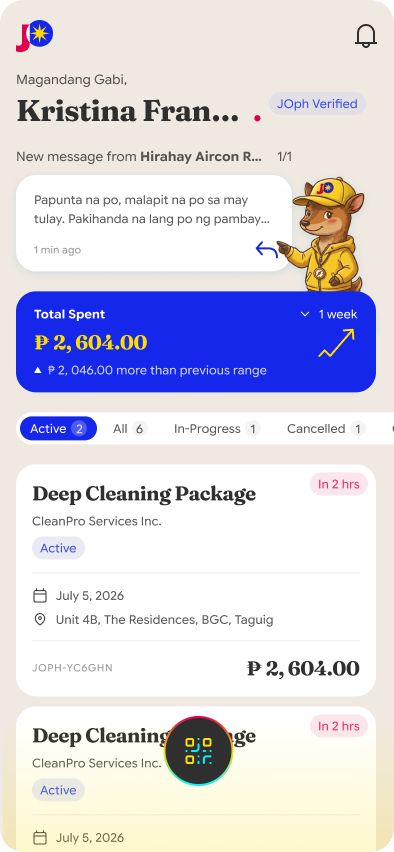
All your active Job Orders live on one home screen — open any of them for full details whenever you need them.
Straight answers, no runaround.
Nothing. ₱0. Customers use JOph free forever — no subscriptions, no hidden charges, no service fees.
Before anyone can offer services, they pass camera-based ID verification — a photo of their government ID plus a selfie holding that ID. You'll go through the same process, so they know you're verified too.
No. JOph isn't a middleman — nobody holds your money. Inside the Job Order you'll see the provider's payment channels; copy the details, pay them directly, then tag the Job Order as Paid so the record closes on both screens. Nothing marked up, nothing skimmed.
Scan their Personnel QR. If an active Job Order from that personnel matches your account, you'll see their cropped face photo and name — proof they're exactly who your provider sent.
You hold the record — the Job Order captures the agreed scope, terms, and schedule, updating live for both sides so there's no "my version vs. yours." And if you ever need to flag a transaction, use @report in-app for platform admins to review.
Yes — and this is where JOph shines. After a successful Job Order, you can message the provider again in-app. No hunting across other apps; they stay right in your thread.
It's scan-scan simple. The entire app is designed around one QR-first flow: scan, accept, track. That's it.
Customers never pay a peso on JOph — and that doesn't change after Beta, after launch, ever.
Not for a month. Not for a year. Forever.
Every feature unlocked while we're in Beta.